
Where Is the Lumbar Support on a Office Chair: Ergonomic Placement and Setup Guide for 2026
Learn where is the lumbar support on a office chair to improve posture, prevent lower back fatigue, and dial in healthy sitting alignment for November 2026.
 By Nashia Baker
Updated November 23, 2026


Long desk sessions frequently trigger dull aches across the lower spine when a workstation lacks targeted pelvic and back stabilization. Understanding exactly %where is the lumbar support on a office chair% makes the difference between maintaining a healthy seated posture and collapsing into an exhausting mid-afternoon slump. Most standard task chairs position this critical contour along the lower third of the backrest, directly targeting the inward curve of the lumbar spine. When aligned correctly, this support maintains the natural lordotic curve, mitigating pressure on the spinal discs and preventing lower back strain during demanding workdays.
Dialing in proper desk ergonomics also complements healthy recovery habits away from the workstation, where choosing supportive sleep setups with balanced mattress dimensions and frame support allows the spine to decompress overnight. At the computer desk, proper backrest calibration ensures that your pelvis remains neutral while keeping your feet flat on the floor. Whether you are adjusting an integrated task chair mechanism or adding a dedicated memory foam cushion, finding the correct spinal apex restores balanced weight distribution and keeps fatigue at bay.
| Award | Product | FCH Score About FCH ScoreThe FCH Score is our own rating from 0 to 10, based on performance, design and build, ease of use, and value. It reflects independent research and is never influenced by manufacturers, retailers, or affiliate commissions. Learn more › | |
|---|---|---|---|
| Best Overall |
Lumbar Support Pillow for Office Chair
|
8.8/10 | Buy |
| Best Value |
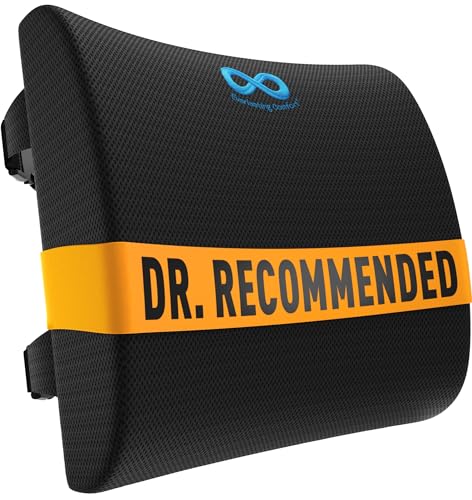 Everlasting Comfort The Original Lumbar Support |
8.3/10 | Buy |
Locating and Positioning the Lumbar Support on an Office Chair
Locating the lumbar support on any office chair starts by identifying the lower third of the backrest, roughly six to ten inches above the compressed seat cushion. This specialized contour is engineered to sit directly against the small of your lower back, specifically filling the space formed by your inward spinal curvature. On standard task chairs, this support may take the form of an integrated curved frame, a vertically sliding plastic paddle, or a dedicated cushion. Pinpointing this location ensures your body receives steady support rather than slouching into unsupported voids during long working hours.
The Anatomical Target: Understanding the Lumbar Curve and Lordosis
Human spinal anatomy features an inward curve in the lower back known as the lumbar lordosis, encompassing five distinct vertebrae labeled L1 through L5. When standing upright, this natural curve evenly distributes body weight across the pelvis and spinal discs without excessive muscular effort. Sitting down changes pelvic orientation, causing the pelvis to rotate backward and flattening the lumbar lordosis into an unnatural C-shape curve. Without targeted contact at this critical junction, the spinal discs face elevated pressure while surrounding back muscles tighten to stabilize the torso.
The exact target for an office chair lumbar curve is the apex of that inward arch, typically positioned just above your beltline. Placing the primary support point against the L3 and L4 vertebrae stabilizes the core structure of the lower spine while leaving the upper ribcage unrestricted. This structural contact discourages pelvic slouching by gently nudging the sacrum and iliac crest into a neutral, forward-facing orientation. A properly supported spine dramatically reduces the risk of muscle spasms and sciatic nerve irritation throughout eight-hour shifts.
Identifying Built-in vs. Adjustable vs. External Lumbar Mechanisms
Office chairs incorporate lumbar support through several mechanical styles depending on their frame design and adjustment hardware. Basic task chairs often rely on a fixed curve molded directly into the plastic backrest structure, which cannot be moved up or down to accommodate varying torso lengths. Mid-range and commercial seating often features an independent lumbar pad mounted on a vertical sliding track located behind the backrest mesh. This track allows desk workers to shift the pad smoothly upward or downward until the apex matches their personal lumbar height.
Advanced ergonomic chairs frequently include dynamic lumbar tension systems or dial-controlled depth mechanisms. These dynamic designs articulate automatically as you recline, applying constant forward pressure against the lower back regardless of your seating angle. Some chairs combine dynamic mesh tension with pivoting pads that flex in response to micro-movements of your torso. When an integrated chair lacks sufficient adjustability or provides an overly flat backrest profile, external ergonomic cushions become necessary to bridge the gap between your lower spine and the chair frame.
External lumbar cushions offer a versatile solution for office workers, commuters, and gamers who need customizable spinal contact across different seating surfaces. Unlike fixed backrests, these portable cushions can be secured using adjustable elastic straps to sit exactly where your lower back requires firm contact. Premium options use precisely molded high-density memory foam cores that gently contour around the body while resisting compression over time. Selecting between integrated hardware and an add-on cushion largely depends on how much adjustability your existing chair frame provides out of the box.
Step-by-Step Procedure to Align Your Office Chair Lumbar Support
Aligning your chair begins before you even touch the backrest controls by first establishing a stable, grounded lower foundation. Sit firmly with your hips pressed fully into the back corner of the seat pan and adjust the pneumatic seat height lever. Your feet should rest completely flat on the floor with your knees bent at approximately a ninety-degree angle, eliminating excessive thigh pressure near the front waterfall edge. If your seat height is set too high or your feet dangle, your pelvis tilts forward and distorts your natural spinal alignment.
Once your seat height is established, identify the small of your lower back by resting your hands on your hips and finding the beltline. Reach behind you to locate the apex of the lumbar curve or the center point of your external cushion. Loosen the adjustment knobs or slide the lumbar mechanism along its vertical track until the thickest part of the contour nestles snugly into the hollow above your hips. If using an external cushion, pull the tension straps tight around the backrest frame so the cushion does not slide downward when you lean back.
After setting the vertical position, check the depth of the support and verify that it does not push your entire torso forward off the seat pan. The contour should gently fill the lumbar gap without creating an exaggerated arch that hyperextends your lower spine. Ensure you maintain two to three fingers of clearance between the back of your knees and the front edge of the seat cushion to preserve healthy circulation. Sit back relaxed against the backrest to confirm that your upper back and shoulders maintain comfortable contact with the chair frame.
Common Positioning Mistakes and How to Correct Them
Setting the lumbar support too low on the backrest is a frequent error that leads to unintended posture complications. When a support pad sits below the beltline against the sacrum or tailbone, it pushes the bottom of your pelvis forward into an awkward anterior tilt. This misalignment forces the lower vertebrae to flatten out rather than maintaining their natural lordotic curve, defeating the primary purpose of ergonomic seating. If you feel pressure directly against your upper glutes or tailbone, slide the support mechanism upward by two to three inches immediately.
Placing the support too high against the middle or upper back introduces an entirely different set of ergonomic problems. When the prominent curve contacts the thoracic spine, it forces your ribcage forward and creates a pronounced hollow in your lower back. This lack of true lumbar contact causes desk workers to hunch their shoulders and slump forward toward their keyboard, increasing neck and trapezius strain. Reposition the pad downward until you feel even, continuous contact along the inward dip of your lower spine rather than pressure between your shoulder blades.
Another widespread mistake involves applying excessive lumbar depth or using an overly thick cushion that forces your lower spine into hyperlordosis. When a rigid lumbar contour protrudes too far into the back, it arches your spine excessively and separates your upper back from the chair backrest. This artificial arch compresses the facet joints in the spine and can quickly generate localized soreness across the paraspinal muscles. The ideal depth should offer balanced support where your lower back feels gently cupped without feeling forcefully shoved away from the seat pan.
Aftermarket Solutions: Comparing Dedicated Lumbar Support Cushions
When an office chair features a flat, unyielding backrest or worn-out internal padding, aftermarket cushions provide targeted ergonomic reinforcement. The Lumbar Support Pillow for Office Chair from QUTOOL addresses this challenge with a contoured memory foam build engineered specifically to relieve upper, mid, and lower back tension. Measuring 16.9 inches long, 15.5 inches wide, and 4.2 inches thick, this model is designed to support individuals weighing between 100 and 200 pounds without flattening under repeated daily compression. It features two upgraded, lengthened straps that secure firmly around office chairs and vehicle seats, paired with a breathable 3D mesh cover that promotes continuous airflow during long work shifts.
Similarly, the Everlasting Comfort The Original Lumbar Support utilizes high-density memory foam to balance firm structural posture support with soft comfort. The manufacturer designed its contoured geometry to trace the natural curvature of the spine, helping desk workers and commuters reduce slouching during prolonged work or gaming sessions. This cushion includes dual adjustable straps equipped with extension pieces that allow it to secure onto chair backrests up to 32 inches wide, preventing slipping or shifting during use. A removable and machine-washable mesh cover keeps the seating surface cool and fresh, making it an adaptable option across home office chairs, recliners, and automobile seats.
Both cushions demonstrate how high-density molded memory foam can restore correct spinal positioning to chairs that lack factory adjustment levers. The QUTOOL pillow provides a well-defined 4.2-inch thickness that works exceptionally well for chairs with deep seat pans where users need extra forward projection to maintain back contact. In contrast, the Everlasting Comfort model emphasizes wide compatibility with its dual extension straps, making it suitable for broader executive chairs or wider gaming backrests. Selecting between these options comes down to checking your chair backrest width, your body frame, and whether you require moderate or pronounced forward lumbar depth.
Daily Posture Habits and Ergonomic Recovery Across the Workday
Proper placement of your lumbar support represents only one part of an effective ergonomic desk setup. If your armrests are set too high, your shoulders remain shrugged, which counteracts the beneficial alignment created by your lower back support. Adjust your desk surface and armrest heights so your elbows rest at a relaxed ninety-degree angle directly in line with your keyboard and mouse. Furthermore, maintaining neutral posture while working complements restful habits at night, such as reviewing twin bed mattress measurements to ensure your sleeping arrangements provide balanced spinal decompression when the workday ends.
Even the most accurately calibrated ergonomic chair cannot replace the physical benefits of regular movement throughout an eight-hour shift. Remaining completely stationary in any seated posture, no matter how supportive, eventually reduces blood circulation and promotes muscle stiffness in the hips and lower back. Incorporating brief standing intervals or gentle standing hip extensions every forty-five minutes re-engages dormant muscle groups and relieves static disc pressure. When you return to your workstation, your body naturally realigns against the lumbar curve without requiring constant fidgeting or readjustment.
Practical Verification: How to Confirm Your Lumbar Support Is in the Right Spot
Verifying the placement of your lumbar support requires a quick physical self-check while sitting in your normal typing position. Lean your upper back comfortably against the chair and pay close attention to where the contact pressure feels strongest across your spine. You should feel a gentle, reassuring contact nestled precisely in the small of your lower back, without any sensation of being pushed forward off the cushion. If your pelvis feels relaxed and your feet remain firmly anchored to the floor without thigh pressure, your lumbar support is correctly calibrated.
Taking a few moments to locate and fine-tune your chair lumbar mechanism transforms your daily desk comfort and prevents cumulative posture strain. Whether you are adjusting a built-in vertical paddle or securing an aftermarket memory foam cushion, aligning the apex with your L1 to L5 vertebrae preserves natural spinal curvature. Listen to your body throughout the workday and make minor height or tilt adjustments whenever you detect subtle lower back tightness. Balanced spinal support keeps you comfortable, alert, and productive through even the most demanding desk sessions.
About the author
Nashia Baker is a home and lifestyle journalist who covers furniture, décor, and everyday living. Her work includes hands-on seating reviews and product comparisons, with particular attention to comfort, materials, and how furniture fits into real homes.