
What Is a Left Return Desk: Practical Guide for 2026
Learn what is a left return desk, how the L-shaped layout functions, and how to optimize your office workspace setup for November 2026.
 By Nashia Baker
Updated October 13, 2026


Setting up a productive home office or corporate workstation begins with establishing a layout that matches daily workflow demands and available floor space. Many professionals encounter spatial bottlenecks when trying to arrange multiple computer monitors, printers, and document files onto a single rectangular surface. Exploring What Is A Left Return Desk helps clarify how an L-shaped furniture configuration can double usable surface area without overwhelming the room perimeter. Understanding these architectural proportions is just as essential as reviewing standard room furniture dimensions when designing a multi-functional space.
A return is a secondary worksurface that attaches perpendicularly to the primary executive shell or writing table. Choosing a left-sided orientation allows users to designate specialized zones for keyboard entry, computer peripherals, and analog paperwork. This arrangement can significantly improve daily ergonomics by maintaining essential supplies within a natural arm sweep. Analyzing how a return operates ensures that your workstation investment supports healthy posture and streamlined productivity across long workdays.
| Award | Product | FCH Score About FCH ScoreThe FCH Score is our own rating from 0 to 10, based on performance, design and build, ease of use, and value. It reflects independent research and is never influenced by manufacturers, retailers, or affiliate commissions. Learn more › | |
|---|---|---|---|
| Best Premium |
SAINTCY 78.7" L-Shaped Executive Standing Desk
|
9.2/10 | Buy |
 Martin Furniture L-Shaped Executive Desk |
8.8/10 | Buy | |
 Furinno Roger Office Desk Return |
8.8/10 | Buy | |
| Best Budget |
 OfficeWorks by Sauder Affirm 60 X 24 Desk |
8.9/10 | Buy |
| Best Overall |
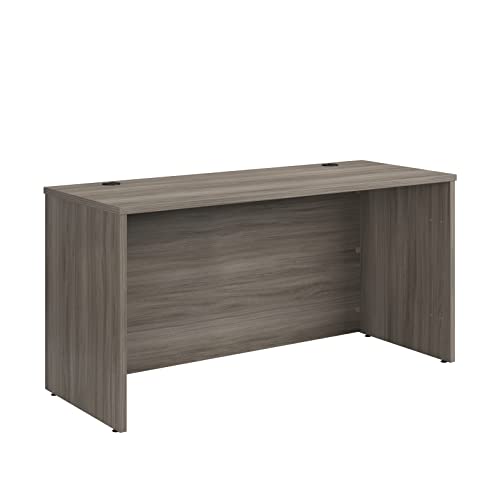 OfficeWorks by Sauder Affirm 60 x 24 Desk Shell |
9.2/10 | Buy |
 Generic 47-Inch L-Shaped Corner Computer Desk |
8.6/10 | Buy | |
 ONNAHOMEStlyle 86.6-Inch L-Shaped Executive |
8.8/10 | Buy | |
| Best Value |
 EUREKA ERGONOMIC 61-Inch L-Shaped Standing Desk |
9.2/10 | Buy |
SAINTCY 78.7" L-Shaped Executive Standing Desk
The SAINTCY 78.7-inch L-Shaped Executive Standing Desk pairs traditional executive furniture presence with motorized sit-stand adjustability, integrated cabinetry, and built-in desktop power. It provides an expansive, highly stable workspace tailored for executives, legal professionals, and home office workers with dedicated office suites.
Pros
- Expansive 78.7-inch L-shaped layout accommodates extensive multi-screen setups, paperwork, and executive peripherals
- Integrated power hub with 2 AC outlets, USB-A, and USB-C ports offers convenient on-desk device charging
- Built-in drawers and storage cabinets reduce desktop clutter and keep critical work documents organized
- Sit-stand functionality provides ergonomic posture versatility without sacrificing traditional executive furniture aesthetics
- Substantial 552-pound construction provides an extraordinarily anchored and solid foundation
Cons
- Extremely heavy 552-pound product weight makes delivery, transport, and multi-person assembly exceptionally challenging
- Fixed left-return layout prevents reversing the configuration for right-hand corner office layouts
- Significant spatial footprint (70.86 x 78.7 inches) requires a large dedicated office space and will not fit compact rooms
Martin Furniture L-Shaped Executive Desk
The Martin Furniture L-Shaped Desk is a substantial 352-pound wood workstation finished on all sides with integrated filing and drop-front keyboard drawers. It is an ideal anchor for remote professionals and hybrid executives seeking an expansive, permanent corner or floating office setup.
Pros
- Substantial 352-pound wood construction delivers rock-solid, grounded stability
- Two built-in file drawers accommodate both letter- and legal-sized hanging folders
- Finished exterior panels allow placement anywhere in an office without exposing unfinished particle board
- Dual drop-front keyboard drawers prevent desktop clutter from cables and peripherals
Cons
- Extremely heavy at 352 pounds, requiring multiple people for delivery, room placement, and assembly
- Fixed 30-inch height offers no motorized or manual sit-stand adjustability
- Thick perimeter trim and drawer enclosures may limit standard C-clamp monitor arm mounting
OfficeWorks by Sauder Affirm 60 x 24 Desk Shell
The OfficeWorks by Sauder Affirm 60 x 24 Desk Shell delivers a substantial, fixed-height workspace anchored by a 1-inch thick, scratch- and heat-resistant melamine top. Weighing over 100 pounds with built-in cord grommets and adjustable levelers, it is an exceptional choice for home office professionals who demand stationary durability or modular L-desk expandability.
Pros
- Substantial 100.55-pound commercial-grade panel build eliminates frame sway and rocking
- Tough 1-inch thick melamine work surface withstands daily heat, liquid spills, and scratches
- Pre-installed dual desktop grommets simplify cable routing for clean multi-device setups
- Modular engineering supports both standalone placement and left- or right-hand L-desk configurations
- Threaded leveling glides provide reliable leveling on uneven flooring
Cons
- Fixed 29.29-inch height does not offer sit-to-stand height adjustability
- Heavy 100-pound package weight requires two people for safe transport and assembly
- Compatible return extensions and storage pedestals must be purchased separately to create an L-shaped setup
Generic 47-Inch L-Shaped Corner Computer Desk
This 47-inch L-shaped corner computer desk integrates a dedicated left return, two storage drawers, and a pull-out keyboard tray to maximize corner layouts. Weighing a substantial 99 pounds, it provides a stable, space-efficient work hub for remote professionals, students, and compact home offices.
Pros
- Corner-friendly L-shaped footprint optimizes tight spaces in apartments, bedrooms, and home offices
- Substantial 99-pound construction gives the desk a grounded, solid feel during daily typing
- Slide-out keyboard tray frees up valuable top surface area for monitors, laptops, or paperwork
- Two integrated drawers provide convenient concealed storage for office accessories and notebooks
Cons
- Fixed left-return layout cannot be reversed for right-hand corner room arrangements
- Fixed 30.4-inch desktop height does not support sit-to-stand height adjustments
- Heavy 99-pound boxed weight may require two people for safe lifting and room assembly
ONNAHOMEStlyle 86.6-Inch L-Shaped Executive
The ONNAHOMEStlyle 86.6-inch L-shaped executive standing desk combines height-adjustable sit-stand capability with substantial built-in storage cabinets and architectural styling. It is an expansive, heavy-duty workstation suited for professionals seeking a commanding presence and extensive surface space in a dedicated executive office.
Pros
- Expansive 86.6-inch footprint provides ample room for multiple monitors, laptops, and paperwork.
- Built-in cabinetry and drawers provide dedicated storage without requiring separate filing units.
- Substantial 458-pound construction offers exceptional grounded stability.
- Striking architectural inverted-trapezoid front with integrated LED ambient lighting.
Cons
- Total weight of 458 pounds demands multi-person handling and intricate room planning for delivery and assembly.
- Fixed left-return layout cannot be reversed for rooms requiring a right-hand orientation.
- Substantial overall footprint requires a dedicated, large executive office or spacious room layout.
EUREKA ERGONOMIC 61-Inch L-Shaped Standing Desk
The EUREKA ERGONOMIC 61-inch L-shaped standing desk pairs an authentic solid wood oak surface with a dual-motor electric lift system spanning 29.8 to 48.3 inches. It is an excellent choice for remote professionals and multi-monitor workers needing an expansive corner layout with dedicated keyboard ergonomics and dependable motorized transitions.
Pros
- Genuine solid wood oak surface offers distinctive grain texture and higher durability than engineered laminate boards.
- Dual-motor motorized system ensures reliable height transitions between 29.8 and 48.3 inches.
- Spacious 61 x 43-inch corner footprint allows seamless task switching between screens, paperwork, and peripherals.
- Thoughtful ergonomic add-ons including an LED monitor shelf, a gel wrist rest keyboard tray, and a USB port.
- Solid steel base provides a sturdy foundation rated to handle gear setups weighing up to 220 pounds.
Cons
- Fixed left-side orientation cannot be reversed for right-handed corner room configurations.
- Substantial unit weight of 123.2 pounds makes two-person handling and assembly highly advisable.
- Generous 61 x 43-inch dimensions require adequate dedicated room space, making it less practical for tight studio alcoves.
Understanding Left Return Desk Configurations and Ergonomics
A left return desk is an L-shaped workstation where the secondary work surface extends to your left side when seated at the primary desk. This architectural layout creates two connected zones that allow workers to separate computing equipment from paperwork and peripherals. Knowing how this orientation functions helps you select the right furniture profile, optimize office traffic paths, and avoid layout mistakes.
Defining the Left Return and Desk Orientation Standards
Furniture makers define desk orientation based strictly on the seated user perspective rather than the view of someone standing in front of the furniture. When you sit in your chair at the main desk facing forward, the return projects perpendicularly from your left side. If that auxiliary surface were on your right side, the setup would be classified as a right return desk. This distinction causes common confusion because looking at a desk from across a room reverses the perceived orientation.
The primary desk and the return serve distinct structural and ergonomic roles within an office setup. The main desk shell is typically deeper, measuring 24 to 36 inches from front to back to accommodate monitors, keyboards, and legroom. The return is usually narrower, frequently measuring 18 to 24 inches deep, functioning as an auxiliary credenza or secondary utility counter. This narrower depth preserves valuable floor space while maintaining a continuous work surface.
Some modular models feature reversible assemblies that let owners install the secondary surface on either side during assembly. In contrast, dedicated left return desks come with pre-drilled brackets, specific modesty panels, and structural crossbeams engineered specifically for a left-sided layout. These fixed configurations often deliver superior structural rigidity and tighter seams between desktop panels. Always check manufacturer assembly manuals to confirm whether a desk is permanently fixed or reversible before purchasing.
Ergonomic Benefits and Workflow Reach Zones
Ergonomic workstation design relies on neutral reach zones to minimize strain on the shoulders, neck, and lower back. The primary reach zone extends roughly 14 to 18 inches from the torso, representing the area reached without leaning forward. An L-shaped desk with a left return allows workers to keep their keyboard and mouse centered while positioning secondary equipment within arm sweep on the return. This setup eliminates awkward torso twisting and repetitive stretching throughout the workday.
Task segregation is another major functional benefit of utilizing a left return configuration. Remote professionals and hybrid knowledge workers can dedicate the primary desk to computing while reserving the left wing for paperwork, notes, or telephone calls. Spreading these tasks across perpendicular surfaces keeps the primary keyboard area clear of physical clutter and visual distractions. Swiveling between dedicated functional zones also encourages better mental focus for distinct daily responsibilities.
Hand dominance also influences how comfortably a worker interacts with a left return layout. Right-handed individuals who spend significant time using an external mouse often appreciate having an unobstructed right side on the main desk, free of adjoining walls or cabinets. Meanwhile, their left hand can easily manage reference binders, secondary tablets, or desktop calculators placed on the return. Left-handed writers benefit from having an expansive, continuous surface directly on their dominant side for handwriting and drafting.
Dimensional Standards, Surface Depth, and Monitor Focal Distance
Evaluating desktop dimensions is essential for ensuring both equipment compatibility and ergonomic visual comfort. Main desk shells commonly measure between 60 and 72 inches wide, with depths typically ranging from 24 to 30 inches. A desktop depth of at least 24 inches provides the minimum clearance required for standard laptop and monitor setups, while a 30-inch depth is preferred for larger displays. Maintaining an eye-to-screen focal distance of 20 to 30 inches helps protect against eye strain during intensive computing sessions.
The return section generally features a more compact profile to conserve room square footage while extending usable horizontal workspace. Standard return surfaces range from 35 to 54 inches in length and 18 to 24 inches in depth. For example, a compact return like the Furinno Roger measures approximately 35.4 inches by 18.9 inches, making it well suited for auxiliary laptops or desktop printers. Larger setups, such as the Martin Furniture L-shaped configuration, provide expansive footprints measuring 68 inches wide by 54 inches deep, accommodating extensive document filing.
Desktop material thickness plays an equally critical role in long-term structural integrity and accessory support. Many commercial desk shells, such as the OfficeWorks by Sauder Affirm series, incorporate a robust 1-inch thick melamine surface that resists scratches, heat, and stains. Thicker, dense desktop cores provide the mechanical strength needed to support heavy C-clamp monitor mounts without bowing the surface. Thinner composite panels may require reinforcement plates underneath the clamp to distribute concentrated loads safely.
Executive Desks Compared to Height-Adjustable Standing Models
Traditional executive desks and modern motorized sit-to-stand workstations offer distinct advantages for left return configurations. Classic executive models, such as those from Martin Furniture, feature heavy wood construction, built-in letter and legal file drawers, and drop-front keyboard trays. These substantial pieces provide extensive integrated storage and anchor private executive offices with a commanding presence. However, their fixed 30-inch surface height means users must rely entirely on chair adjustments and footrests to maintain proper ergonomic alignment.
Motorized L-shaped standing desks combine the expansive geometry of a left return with dynamic height adjustability. Advanced models like the EUREKA ERGONOMIC 61-inch L-shaped standing desk utilize dual motors to travel smoothly between seated heights around 29.8 inches and standing heights up to 48.3 inches. These height-adjustable frames feature programmable memory presets that allow users to transition between sitting and standing with a single button press. Motorized frames also include steel bases with substantial weight ratings, such as 220 pounds, to safely lift multiple monitors and equipment.
Large executive standing workstations, such as the SAINTCY 78.7-inch and ONNAHOMEStyle 86.6-inch models, bridge the gap between traditional executive furniture and ergonomic sit-to-stand technology. These designs incorporate architectural profiles, built-in storage cabinets, and integrated AC power hubs alongside motorized lifting systems. When selecting an adjustable L-shaped desk, buyers must ensure that all power and display cables possess sufficient slack to travel the full vertical stroke. A snagged wire during elevation can pull expensive electronics off the desk or cause motor synchronization errors.
Room Planning, Traffic Flow, and Architectural Placement
Careful room layout planning is vital when introducing an L-shaped workstation into a private office or home study. A left return desk naturally fits into a room corner, placing both working surfaces flush against adjacent walls to conserve open floor space. Alternatively, the main desk can face outward into the center of the room while the left return runs along a perimeter wall. This executive layout gives the worker a clear view of the room entrance while cleanly cordoning off the personal work area from visitor traffic.
Doorway swings, window placements, and heating registers must all be measured before positioning a large workstation. Positioning a desk return directly across a doorway path can obstruct natural movement through the room and create unpleasant pinch points. When organizing multi-functional spaces, such as a hybrid home office that also doubles as a guest bedroom, room dimensions require the same careful spacing seen in bunk bed wall placement principles to ensure safe clearances around windows and heating vents. Leaving at least 36 inches of open walkway around the desk ensures effortless mobility and comfortable chair roll.
Window placement relative to the left return also impacts daily visual comfort and productivity. If the return surface is positioned directly beneath an unshaded window, sunlight can cause harsh reflections on auxiliary monitors and mobile device screens. Positioning the workstation perpendicular to windows allows natural light to illuminate the desktop from the side without creating direct screen glare. Adjustable window blinds or sheer curtains help maintain balanced ambient light levels across both desktop wings throughout the day.
Cable Management and Integrated Power Delivery
Managing cords across an L-shaped desk requires thoughtful planning because cables must span two distinct desktop panels. Quality desks incorporate built-in desktop grommet holes that allow computer cables, monitor connections, and charging cords to pass cleanly beneath the work surface. The OfficeWorks by Sauder Affirm series, for example, features two integrated grommets that route power cords straight down through the modesty panels. These pass-through channels keep the main typing surface neat while preventing tangled wires from dangling around your feet.
Under-desk cable management trays or horizontal raceways are essential for securing multi-outlet power strips and surge protectors. Mounting a heavy-duty wire basket beneath the corner junction between the main desk and the return keeps bulky AC adapters off the floor. This junction point provides the shortest routing distance to power devices located on either desktop wing. Bundling peripheral cables together with reusable hook-and-loop straps creates clean, organized harnesses that resist accidental disconnections when adjusting your task chair.
Integrated technology hubs have become a standard feature on modern executive and standing left return desks. Models like the SAINTCY executive desk feature built-in AC outlets alongside USB-A and USB-C charging ports built directly into the desktop surface. These embedded power modules allow users to charge smartphones, wireless headphones, and tablets without crawling underneath the frame to locate an open wall socket. Grounding all office electronics through a certified surge protector safeguards sensitive computing hardware from electrical spikes.
Monitor Placement and Display Ergonomics Across Two Surfaces
Configuring monitors on an L-shaped desk requires aligning display heights and viewing angles with natural head posture. Your primary display should be positioned directly in front of your natural seated position on the main desk shell. The top third of the monitor screen should align with or sit slightly below eye level when sitting upright with relaxed shoulders. This alignment maintains a neutral cervical spine posture and avoids the chronic neck strain caused by looking upward or downward for extended periods.
Secondary displays can be placed either adjacent to the main screen or angled along the left return surface. When placing an auxiliary monitor or laptop on the left return, angle the screen roughly 30 degrees toward your central seated position. This inward tilt creates a semi-circular viewing cockpit that allows you to glance at email, spreadsheets, or reference data with a slight head turn rather than a complete torso twist. Using fully articulating monitor arms clamped to the rear edge of the desk lets you fine-tune display angles and frees up surface space underneath.
Dual-monitor power users who utilize ultra-wide displays or twin 27-inch screens must ensure their desk frame provides adequate structural support. Clamping two heavy monitors to a single mounting pole creates a concentrated downward force on the desktop edge. Placing that clamp on a solid wood top or a reinforced 1-inch melamine panel prevents structural deflection and eliminates distracting monitor wobble while typing. Always verify that the desktop substrate is solid core rather than hollow paper honeycomb before tightening heavy-duty metal clamps.
Assembly Alignment, Structural Leveling, and Long-Term Maintenance
Assembling an L-shaped desk with a left return demands methodical hardware installation and careful seam alignment. Begin by assembling both the main desk frame and the return shell on a soft, protective surface to prevent scratching the finish. When connecting the two desktop sections with mending plates and corner brackets, hand-tighten all fasteners before torquing them down completely. This approach allows you to shift the panels slightly to achieve a perfectly flush transition across the desktop surface before locking the hardware into place.
Floor leveling is critical for preventing frame racking, drawer misalignment, and annoying desk wobble. Most quality desks feature adjustable leveling glides beneath each leg column or pedestal base. On uneven hardwood floors or thick carpeting, rotate these leveling feet individually until the entire L-shaped frame rests flat and solid. Using a spirit level across both the main surface and the left return ensures that pens will not roll away and that motorized lifting columns experience uniform resistance during travel.
Long-term maintenance keeps a left return desk stable and visually appealing through years of daily use. Inspect structural bolts, corner brackets, and leg fasteners every six to twelve months, tightening any hardware that may have loosened from task chair movement or daily vibration. Clean commercial laminate and melamine tops using a soft damp microfiber cloth and mild soap, avoiding harsh abrasive cleaners that can dull protective surfaces. Solid wood surfaces benefit from periodic conditioning with furniture oil to maintain natural grain luster and protect against humidity changes.
Selecting a left return desk provides a balanced combination of expansive surface area, ergonomic task separation, and structured room planning. Matching the desk dimensions, storage configuration, and lifting capabilities to your specific physical workspace ensures long-term comfort and elevated productivity. By measuring room clearances accurately and establishing proper monitor reach zones, you can build a highly functional workstation that supports your professional workflow for years to come.
About the author
Nashia Baker is a home and lifestyle journalist who covers furniture, décor, and everyday living. Her work includes hands-on seating reviews and product comparisons, with particular attention to comfort, materials, and how furniture fits into real homes.