
What Is the Length and Width of a Desk: Sizing Guide for 2026
Understanding what is the length and width of a desk helps you pick the right workspace size, monitor clearance, and room layout in November 2026.
 By Zoe Sessums
Updated November 23, 2026


Proper workspace planning begins with understanding how desktop surface measurements affect your posture and daily physical comfort. Determining what is the length and width of a desk helps you prevent chronic shoulder strain, wrist fatigue, and cluttered work areas. A standard residential workstation generally spans between 48 and 72 inches in length, while the width or front-to-back depth typically ranges from 24 to 30 inches. Choosing the right surface proportions ensures that your laptop, external screens, and essential desk tools fit comfortably without overcrowding your room.
Spatial boundaries become especially critical when setting up a dedicated workstation within a compact apartment alcove or a shared guest room. When staging an office area in multi-purpose bedrooms, comparing your desk footprint against standard bed dimensions helps you preserve unobstructed walkways and open door clearance. Smaller study desks often measure 36 to 42 inches in length with a slim 20-inch depth for tight corners. Meanwhile, multi-screen computer workstations require a length of 60 inches or more alongside a full 30-inch depth to maintain healthy visual focal distances.
| Award | Product | FCH Score About FCH ScoreThe FCH Score is our own rating from 0 to 10, based on performance, design and build, ease of use, and value. It reflects independent research and is never influenced by manufacturers, retailers, or affiliate commissions. Learn more › | |
|---|---|---|---|
|
WDXDOWF Funny Office Desk Decor Sign
|
8.4/10 | Buy | |
| Best Premium |
 Across-Star 32-40 Inch Expandable Dual Monitor |
9.1/10 | Buy |
 Signs ByLITA It Is What It Is 2x8 Novelty Desk |
7.8/10 | Buy | |
| Best Budget |
 HEYTUYA Everything is Figureoutable Wooden Desk |
8.8/10 | Buy |
| Best Overall |
 Across-Star Adjustable Dual Monitor Stand Riser |
9.2/10 | Buy |
| Best Value |
 Liitrton Mobile CPU Stand |
8.3/10 | Buy |
 Funny Office Desk Decor Sign |
8.0/10 | Buy | |
 Nnewvante 60-Inch Bamboo Dual & Triple Monitor |
7.8/10 | Buy |
WDXDOWF Funny Office Desk Decor Sign
The WDXDOWF What Now Desk Sign is a compact, 6.3-by-3.9-inch ABS plastic novelty plaque designed to add personality to home office workstations and corporate cubicles. It delivers a humorous visual accent that sits easily on any flat surface without crowding valuable desktop space.
Pros
- Slim, space-conscious 6.3 x 3.9 inch footprint preserves usable desk real estate for peripherals and paperwork
- Durable ABS plastic build holds up well against everyday desk bumps and drops
- Vibrant warning-sign styling provides an instant visual accent and lighthearted humor for workstations
- Zero assembly required, sitting neatly on flat desks, cubicle counters, or office shelving
Cons
- Lightweight 0.15-pound build can easily shift or tip over if brushed during fast-paced desk tasks
- Compact dimensions may look undersized on expansive executive desks or multi-monitor workstations
- Humorous warning-sign tone may not align with strict or traditional corporate office settings
Across-Star 32-40 Inch Expandable Dual Monitor
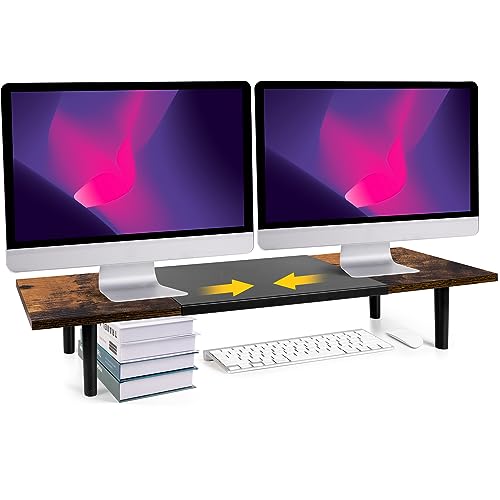
The Across-Star Expandable Dual Monitor Stand Riser provides a 32 to 40-inch adjustable wood and metal shelf supporting up to 70 pounds across dual screens or office gear. It offers remote workers, gamers, and students an easy way to elevate displays to eye level while reclaiming keyboard storage space on busy desks.
Pros
- Telescoping width easily adjusts between 32 and 40 inches to match diverse desk dimensions
- Solid 70-pound load rating securely supports two displays, heavy laptops, or desktop all-in-one printers
- Generous 4.72-inch under-shelf clearance frees up usable desktop space by stowing keyboards and mice
- Fast, tool-free assembly with included hardware and screw-in solid wood legs
Cons
- Fixed 4.72-inch elevation cannot be adjusted vertically to fine-tune individual eye levels
- Center sliding metal plate creates a visible transition seam between the two wood panels
- Fixed 9.25-inch platform depth may feel narrow for extra-deep tripod monitor feet
Signs ByLITA It Is What It Is 2x8 Novelty Desk
The Signs ByLITA 'It Is What It Is' novelty desk sign is a freestanding 2x8-inch nameplate built to bring relatable office humor to any workstation or cubicle. Its compact footprint and high-contrast design allow it to fit cleanly on crowded desks without taking up valuable workspace.
Pros
- Space-efficient 2x8-inch footprint fits on compact desks without displacing keyboards or mouse pads
- Freestanding tabletop base stands upright reliably on wood, laminate, and glass surfaces
- High-contrast lettering provides crisp readability across the desk or on video conference backgrounds
- Comes completely pre-assembled and ready to display right out of the box
- Versatile gift option for home office workers, corporate colleagues, and white elephant exchanges
Cons
- Serves an entirely decorative purpose without offering storage, cable management, or functional desk organization
- Lightweight 0.37-pound build can slide if accidentally caught by moving mouse cords or power cables
- Fixed horizontal orientation cannot be converted to a vertical or wall-mounted format
HEYTUYA Everything is Figureoutable Wooden Desk
The HEYTUYA Everything is Figureoutable wooden box sign is a compact 5.9-inch freestanding desk accent designed to bring daily motivation to home office setups. It takes up minimal surface space while resting neatly beside monitors, laptop stands, or desk shelves.
Pros
- Compact 5.9-inch square size preserves valuable desktop surface space for monitors and peripherals
- Freestanding hollow-back design requires no tools, screws, or wall mounting to display
- Hand-polished wooden edges offer smooth craftsmanship without rough burrs
- Subtle black farmhouse styling pairs well with contemporary computer workstations
Cons
- Slim 0.4-inch depth profile can be knocked over if bumped during fast typing or desk transitions
- Purely decorative accessory that provides no built-in storage, cable routing, or organization utility
Across-Star Adjustable Dual Monitor Stand Riser
The Across-Star Dual Monitor Stand Riser is an expandable 32-to-40-inch desktop shelf engineered to lift two displays to eye level while supporting up to 70 pounds. It is an ideal addition for remote workers, students, and multi-screen users looking to reclaim desk space for keyboard storage without replacing their workstation.
Pros
- Telescoping 32-to-40-inch width accommodates different monitor sizes and desk dimensions with ease
- Substantial 70-pound load rating securely supports dual computer screens, heavy monitors, or desktop printers
- Under-shelf open bay frees up valuable desktop space to stow a full-size keyboard and mouse
- Simple assembly process takes only a few minutes without requiring specialized tools
Cons
- Fixed 4.72-inch elevation provides no micro-height adjustment for personalized screen tuning
- The 9.25-inch platform depth may fit snugly under monitors with exceptionally deep pedestal bases
- The sliding design leaves an exposed metal plate seam on the shelf surface rather than a single continuous wood plane
Liitrton Mobile CPU Stand
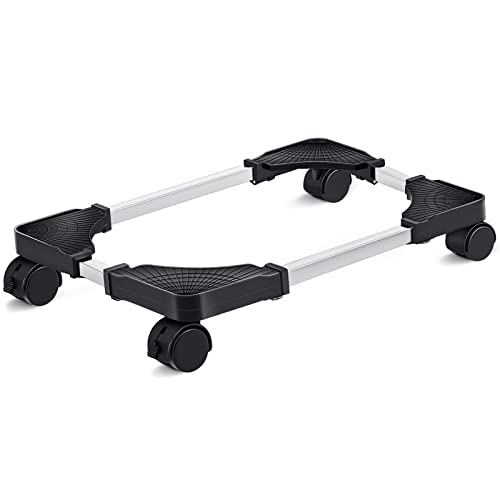
The Liitrton Mobile CPU Stand provides an adjustable under-desk rolling platform that keeps computer towers off dusty floors while freeing up desktop real estate. Built with telescoping steel tubes, locking casters, and non-slip ABS corners, it offers a practical mobility solution for home office workers and PC gamers.
Pros
- Reclaims significant desktop real estate on compact, multi-monitor, or gaming desks
- Two-way size adjustment accommodates a wide range of standard ATX and mid-tower computer cases
- Elevates bottom intake fans off dusty floors and carpets to promote cleaner airflow
- Smooth 360-degree casters make accessing rear ports and cleaning under the desk simple
Cons
- Lightweight ABS and steel tube construction may exhibit slight flex under exceptionally heavy full-tower liquid-cooled systems
- Compact caster wheels roll smoothly on hard floors and mats but can face resistance on plush high-pile carpets
- Does not include raised perimeter side rails or retention straps for securing towers against forceful bumps
Nnewvante 60-Inch Bamboo Dual & Triple Monitor
The Nnewvante 60-Inch Bamboo Monitor Stand Riser elevates up to three 27-inch displays while providing flexible length and angle adjustment across your existing workstation. Crafted from 0.59-inch solid bamboo with integrated storage slots and keyboard clearance, it offers a sturdy, organized upgrade for multi-monitor home office setups.
Pros
- Flexible pivoting side shelves adapt easily to both straight desks and L-shaped corner workstations
- Solid 0.59-inch bamboo build provides better structural feel and surface resistance than synthetic particleboard
- Generous 3.9-inch elevation creates valuable open space underneath to stow keyboards and clean up desktop clutter
- Built-in phone slots and rear cord cutouts deliver practical everyday utility without requiring add-on accessories
Cons
- Shelf height is fixed at 3.9 inches and cannot be micro-adjusted vertically once assembled
- Requires a wide desktop surface of at least 48 to 60 inches to take full advantage of the maximum extension
- Intended for freestanding monitor bases rather than mounting heavy clamp-on monitor arms directly to the shelf edges
Understanding Desk Length, Width, and Surface Sizing for Ergonomic Workspaces
Standard home and professional office desks typically range from 48 to 72 inches in horizontal length, accompanied by a front-to-back width or depth of 24 to 30 inches. Compact writing models can measure as small as 36 inches in length and 20 inches in width, whereas expansive executive and gaming setups frequently exceed 72 inches across. Understanding how these baseline measurements impact your equipment layout, optical focal distance, and physical room boundaries ensures you pick a configuration that supports long-term productivity.
Clarifying Length, Width, and Depth Terminology in Office Furniture
Furniture manufacturers and retailers frequently use the terms width and length interchangeably, which often leads to confusion when ordering online. In traditional workspace design, length or primary width refers to the horizontal measurement spanning from the far left edge to the far right edge of the table. In contrast, depth represents the front-to-back distance from the front rim where your chair sits back to the rear edge that rests against the wall. Some product specification listings reverse these terms by calling the front-to-back span the width, so verifying the dimensional diagram is essential.
Vertical height serves as the third vital dimension in complete workstation space planning. Standard fixed-height seated desks measure between 28 and 30 inches from the floor to the top surface, which suits the average adult seated elbow height. Height-adjustable standing desks expand this vertical dimension substantially, utilizing motorized lifting columns that travel from roughly 25 inches at their lowest point up to 48 inches or higher. Recognizing which measurement describes each physical axis prevents misjudging whether a specific frame will accommodate your chair, monitors, and room walls.
International furniture specifications introduce metric dimensions that occasionally cause confusion during spatial planning. Many imported desks list primary dimensions in centimeters, such as 120 centimeters for a 48-inch length or 150 centimeters for a 60-inch surface. Furthermore, beveled desktop chamfers or decorative contoured edges can reduce the actual flat working surface by an inch or two along the perimeter. Checking the precise usable flat area ensures your computer mounts and accessories sit flush against the tabletop without hanging awkwardly over curved edges.
Standard Dimensions Across Common Desk Styles and Workstation Formats
Compact writing desks cater directly to studio apartments, small guest rooms, and minimalist study corners. These smaller workstations generally provide a length between 36 and 48 inches along with a shallow depth of 20 to 24 inches. A compact footprint supports a standard laptop, a writing tablet, and a modest decorative item without occupying excessive room volume. However, this condensed surface rarely leaves enough space for oversized displays, dual-screen arms, or dedicated external speakers.
Standard computer desks expand on these proportions to balance peripheral capacity with practical room usage. A typical computer desk measures between 48 and 60 inches in length and 24 to 30 inches in depth. This dimensional profile easily accommodates a full-size mechanical keyboard, an external monitor, a mouse pad, and a desktop lamp. For knowledge workers managing larger equipment, executive desks and specialized gaming tables stretch from 60 to 72 inches or more, frequently pairing that length with a generous 30- to 36-inch depth for maximum reach.
Modular and L-shaped corner desks offer an alternative footprint by splitting the working area across two connected sections. A standard L-shaped configuration features a primary desk section measuring 60 inches by 30 inches paired with an attached side return measuring 40 to 48 inches in length and 20 inches in depth. This arrangement creates a spacious wraparound command center that fits neatly into a room corner without intruding into central walking paths. It allows users to separate focused computer typing tasks on one wing from paper organization or hardware testing on the other.
Ergonomic Viewing Distance and Desktop Depth Requirements
Desktop depth directly controls your optical focal distance, upper body posture, and forearm comfort during computer work. Positioning an external monitor too close to your face causes severe visual fatigue, dry eyes, and subconscious forward neck straining. Ergonomic standards suggest maintaining a viewing distance of approximately 20 to 30 inches between your eyes and the center of the screen. A minimum desk depth of 24 inches provides just enough space to achieve this distance when using a single compact monitor or a laptop.
Modern displays measuring 27 inches, 32 inches, or 34 inches in ultrawide formats require a deeper surface of 30 inches. Manufacturer monitor stands consume significant front-to-back real estate, often eating up 7 to 10 inches of depth right in the center of the desk. When a desktop is too shallow, the keyboard is forced uncomfortably close to your torso, causing your wrists to bend at sharp, unnatural angles. Opting for a 30-inch surface depth ensures you can position heavy screens far enough back while resting your forearms flat on the desktop.
Under-desk keyboard trays can offer a practical workaround if you are working with a restricted 20- to 24-inch desk depth. Installing a retractable keyboard tray effectively pulls your input devices 10 to 12 inches forward beyond the front edge of the desk frame. This mechanical extension moves your seated eye position further away from the display without requiring a larger desktop slab. However, keyboard trays can reduce vertical knee room, so you must carefully verify under-desk clearance before choosing this solution.
Horizontal Surface Length for Single, Dual, and Triple Monitor Setups
Planning your desktop length requires calculating the physical width of your digital monitors and desk accessories. A single 24-inch or 27-inch display requires approximately 22 to 24 inches of horizontal space, which fits easily on a 40- to 48-inch desk. When you transition to a dual-monitor setup using two 27-inch displays, the side-by-side span expands to roughly 48 to 52 inches wide. To prevent monitor bezels from extending over the side edges, a dual-screen workstation needs a minimum desk length of 55 to 60 inches.
Dedicated monitor stands and desktop risers help organize this expansive display footprint by elevating screens and opening storage below. The Across-Star Dual-Monitor-Stand-Riser-For-Desk features an adjustable length ranging from 32 to 40 inches, enabling users to fine-tune the riser width to match their display spacing while stowing a full-size keyboard underneath. The sturdy wood and metal structure supports up to 70 pounds, keeping dual screens elevated at eye level to ease neck strain. By elevating displays, these accessories free up valuable desktop area for writing materials and charging hubs.
Large triple-monitor workstations demand even greater horizontal length to maintain stability and natural viewing angles. The Nnewvante Monitor Stand Riser provides an adjustable length spanning from 43.3 to 60.7 inches across three bamboo shelves, accommodating triple 27-inch screens with angled side wings. When deploying such wide display accessories, selecting a desk with a length of 60 to 72 inches is necessary to ensure the entire riser sits securely on the tabletop. An expansive desktop length prevents heavy outer display edges from tipping or unbalancing the entire workstation.
Under-Desk Clearance for Knee Room, Swivel Motion, and CPU Placement
Evaluating a desk involves looking beneath the surface to inspect usable legroom, knee clearance, and foot space. Standard ergonomic guidelines recommend an unobstructed horizontal knee well measuring at least 24 to 30 inches in width. Bulky side pedestals, drop-down pencil drawers, or low structural crossbars can drastically reduce this opening, leading to painful knee collisions. Providing a minimum knee depth of 15 to 18 inches at seated knee level prevents your legs from hitting the modesty panel during daily adjustments.
Stowing computer hardware beneath the desktop surface helps maintain a clean visual aesthetic while demanding careful space planning. A full-tower computer chassis sitting on the floor consumes roughly 8 to 12 inches of width and up to 20 inches of depth. The Liitrton Mobile CPU Stand Adjustable Computer Tower Stand accommodates these towers with an adjustable length of 16.93 to 22.44 inches and an adjustable width of 9.06 to 14.57 inches. Its rolling casters elevate the computer case off dusty floors and improve thermal airflow while sliding neatly under or alongside your desk legs.
Swivel clearance and footrest placement also factor into your under-desk spatial calculations. If you use an ergonomic footrest or like to cross your legs, a narrow 24-inch knee well will quickly feel confining. Selecting a desk frame with wide-set legs or a cantilevered C-frame design creates open, unobstructed leg space across the entire underside. This open architecture allows you to swivel freely between different tasks without your knees clipping metal frame braces or cable routing brackets.
Measuring Room Boundaries, Walkways, and Furniture Placement
A desk may appear perfectly proportioned on an online specification sheet while completely overwhelming your physical room layout. Professional interior planning guidelines suggest leaving at least 30 to 36 inches of clear floor space behind your desk to push back an office chair comfortably. Primary walkways running through an office or bedroom require 36 to 42 inches of clearance so people can pass without squeezing through. Factoring in these perimeter boundaries before choosing your desk length and depth prevents crowded room conditions.
Setting up a workstation in a shared bedroom calls for careful alignment with surrounding furniture pieces. Utilizing established bedroom layout placement strategies helps you position a desk along an open wall without blocking closet doors, dressers, or window light. Placing a 48-inch writing desk perpendicular to a window often maximizes natural daylight while minimizing screen glare. Adding compact accents like the Signs ByLITA novelty desk sign or humorous decorative blocks adds personality to your work area without occupying valuable practical surface room.
Doorway swings and electrical wall outlet access represent additional spatial factors that many buyers overlook. A swinging interior door requires roughly 32 to 36 inches of unobstructed swing arc, which can easily strike the corner of an oversized desk. Positioning your desk within 3 to 6 feet of dedicated wall outlets also prevents power cords from stretching across open floor walkways as tripping hazards. Mapping your room boundaries with blue painter tape before purchasing allows you to visualize the real footprint of your proposed desk dimensions.
Desktop Core Materials, Weight Capacity, and Monitor Clamp Tolerances
Desktop thickness and core structural density play an equally critical role alongside horizontal length and width measurements. Most mass-market computer desks feature a top thickness ranging between 0.7 inches and 1.25 inches. Solid hardwood, genuine bamboo, and dense medium-density fiberboard provide exceptional resistance against sagging when supporting heavy equipment over wide spans. In contrast, lightweight hollow-core panels filled with cardboard honeycomb can bow or crack if loaded with heavy books and multi-monitor arms.
Heavy C-clamp monitor mounts concentrate substantial torque onto a small contact patch along the rear edge of the desktop surface. Dual and triple displays hanging from a single clamp can generate downward leverage that easily crushes hollow particleboard. If your desk features a thinner composite top, inserting steel reinforcement plates distributes the clamping force across a broader surface area. Solid bamboo boards, such as the 0.59-inch thick panels used on the Nnewvante monitor riser, provide the structural rigidity needed to handle concentrated accessory weight without splintering.
Dynamic lifting capacity versus static resting load ratings must also be weighed when choosing adjustable standing desk frames. A manual or motorized frame might claim a static weight capacity of 200 pounds, but its dynamic lifting rating under active motorized travel may be lower. Heavy monitors, monitor risers, desk organizers, and mounted audio gear quickly add up to 50 or 60 pounds of hardware. Checking both the structural thickness of your desktop and the frame load capacity ensures smooth, wobble-free adjustments throughout years of ownership.
Practical Sizing Recommendations Based on Your Daily Workflow
Matching your desk dimensions directly to your daily workflow helps you avoid both cramped frustration and wasted room space. Casual laptop users, writers, and students generally find that a 40-inch to 48-inch length with a 24-inch depth provides plenty of functional workspace. This compact size accommodates a laptop, an external mouse, and a notebook while leaving space for small personal accents. It fits comfortably in tight studio apartments without requiring structural rearrangements.
Hybrid knowledge workers utilizing dual monitors, external webcams, and docking stations benefit significantly from a 60-inch length and 30-inch depth. This surface footprint provides sufficient space to separate your keyboard from your screens while keeping work materials within an easy arm reach. For power users running desktop towers, printers, and audio interfaces, a 72-inch workstation or modular L-shaped configuration offers the required surface expanse. Taking time to map your equipment layout against these dimensions ensures long-term comfort and productivity.
Height-adjustable sit-to-stand frames introduce subtle stability nuances that depend heavily on surface dimensions. Desks with longer spans of 60 to 72 inches experience slightly more lateral sway at standing heights between 42 and 48 inches if equipped with lighter two-stage telescoping legs. Selecting a frame with sturdy three-stage lifting columns and an expandable steel crossbeam ensures rock-solid stability even at full height. Balancing your surface length with heavy-duty frame engineering creates an ergonomic workspace that supports active, healthy work habits every day.
Selecting the right desk length and width fundamentally shapes your daily comfort, posture, and workplace efficiency. Verifying both the front-to-back depth for healthy eye strain relief and horizontal length for peripheral organization ensures you build an ergonomic setup tailored to your space. Always measure your room boundaries, walkway clearances, and chair travel space before finalizing your desk purchase to guarantee a seamless home office integration.
About the author
Zoe Sessums is a design writer and editor whose work spans home tours, furniture reviews, and interior design. She has written about sofas, accent chairs, and versatile home furnishings, bringing an eye for design and everyday usability to her coverage.