
What Are the Different Desks in Industry: Practical Guide for 2026
Explore what are the different desks in industry for November 2026 to compare executive, standing, writing, and portable workstation options.
 By Janae McKenzie
Updated October 13, 2026


Selecting the proper work surface serves as the cornerstone of building a functional, pain-free office layout. Understanding what are the different desks in industry allows professionals and remote workers to balance physical room limitations with demanding technological hardware. In shared bedrooms and hybrid apartments, coordinating furniture footprints alongside standard bed dimensions helps preserve necessary walking corridors while ensuring sufficient clearance for ergonomic task chairs. Choosing the wrong configuration often leads to cramped legroom, visual fatigue, and cluttered workspaces.
Workstation design has evolved far beyond the traditional fixed-height utility table. Modern workspaces require specialized furniture geometries ranging from heavy executive suites and motorized sit-stand frames to ultra-portable lap stations and rugged field units. Each commercial category addresses distinct ergonomic postures, monitor weight distributions, and spatial requirements. Exploring these structural categories ensures you choose a durable surface that supports neutral typing angles, accommodates complex display configurations, and maintains lasting stability under continuous daily use.
| Award | Product | FCH Score About FCH ScoreThe FCH Score is our own rating from 0 to 10, based on performance, design and build, ease of use, and value. It reflects independent research and is never influenced by manufacturers, retailers, or affiliate commissions. Learn more › | |
|---|---|---|---|
|
Tribesigns 63-Inch Industrial Executive Desk
|
8.1/10 | Buy | |
 It's Not How Good You Are |
8.1/10 | Buy | |
| Best Value |
 Rite in the Rain Monsoon Field Desk |
8.1/10 | Buy |
| Best Premium |
 AWQM 3-Piece Coffee Table and Side Table Set |
8.6/10 | Buy |
| Best Budget |
 HOOBRO Folding TV Tray Tables Set of 2 |
8.6/10 | Buy |
| Best Overall |
 Roost V3 Ultra-Portable Adjustable Laptop Stand |
8.8/10 | Buy |
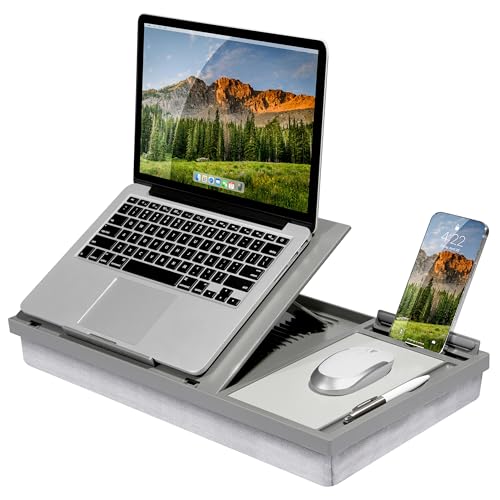 LapGear Ergo Pro Lap Desk with 20 Adjustable |
8.1/10 | Buy | |
 AWQM 3-Piece Industrial Coffee and End Table Set |
8.1/10 | Buy |
Tribesigns 63-Inch Industrial Executive Desk
The Tribesigns 63-inch Executive Desk pairs an expansive 63 by 27.6-inch work surface with a reinforced 1.6-inch thick top and 1.57-inch steel tube legs. It is an excellent choice for remote professionals and hybrid workers who need reliable multi-monitor space without the cost or complexity of motorized mechanisms.
Pros
- Expansive 63 by 27.6-inch surface easily accommodates multi-screen workstations and desk accessories
- Substantial 1.6-inch thick desktop and 1.57-inch metal frame provide dependable structural rigidity
- Triangular reinforcement brackets noticeably minimize side-to-side racking and frame sway
- Open leg structure allows uninhibited leg movement and room for under-desk storage units
Cons
- Fixed 29.5-inch height offers no vertical adjustability for sit-stand flexibility
- Lacks integrated desktop cable pass-through grommets or under-desk wire management trays
- Combined 1.6-inch top thickness and perimeter frame position require checking monitor arm C-clamp depth
Rite in the Rain Monsoon Field Desk
The Rite in the Rain Monsoon Field Desk is a portable 13 by 9.7-inch mobile writing workstation built with waterproof TPU fabric, welded seams, and a burly rust-resistant clamp. It delivers dependable weather protection and a secure one-handed writing platform for outdoor inspectors, technicians, and mobile workers.
Pros
- Watertight welded construction and TPU material shield paperwork in wet and unpredictable weather
- Heavy-duty rust-resistant clamp keeps field sheets securely anchored during active use
- Dual-zipper configuration lays completely flat to create an even, portable writing surface
- Webbed back handle makes mobile and standing document entry significantly easier to manage
Cons
- Compact 13-inch by 9.7-inch size is tailored for paperwork and will not accommodate laptops or oversized clipboards
- Flexible TPU fabric body offers less rigid backing than thick aluminum or hard plastic field boxes
- Interior storage capacity is limited to standard paperwork, thin forms, and basic flat stationery
AWQM 3-Piece Coffee Table and Side Table Set
The AWQM 3-Piece Table Set provides a versatile living room arrangement featuring a 41.3-inch coffee table and two matching side tables built with FSC-certified wood tops and iron frames. It offers a practical, multi-surface setup for casual laptop sessions, entertainment gear, and compact apartment spaces.
Pros
- Provides three coordinating surfaces to outfit an entire living area or hybrid living-working space in one matching package
- Sturdy iron frame and FSC-certified wood surface combination delivers reliable day-to-day durability
- Built-in bottom mesh shelf provides dedicated storage to quickly clear clutter away from the primary tabletop
- Adjustable leveling feet make it easy to stabilize each table across area rugs, tile, or uneven hardwood floors
Cons
- Fixed low profile (18.11 inches high for the coffee table) is built for sofa use rather than standard ergonomic task chairs
- Open metal wire mesh on the lower shelf may allow very small desktop items or loose pens to slip through if uncontained
- Not intended for heavy clamp-on monitor arms or full desktop PC tower workstations
HOOBRO Folding TV Tray Tables Set of 2
The HOOBRO Folding TV Tray Tables provide a flexible, space-conscious workstation solution for couch-side computing, casual reading, or dining. Featuring a sturdy metal frame and protective foot pads, this two-pack folds flat for effortless storage in tight living areas.
Pros
- Fold-flat design reclaims valuable floor space in tight apartments, dorms, and multipurpose rooms
- Convenient two-pack delivers flexible workstation utility across different rooms in the home
- Integrated plastic base pads protect flooring from scratches during frequent repositioning
- Surface easily accommodates casual laptop tasks, tablet browsing, or quick work-from-home sessions
Cons
- Fixed 26.2-inch height lacks vertical adjustability for varying chair heights or standing setups
- Compact surface dimensions cannot support clamp-on monitor arms or bulky external peripherals
- Engineered for lightweight daily tasks rather than heavy desktop hardware arrays
Roost V3 Ultra-Portable Adjustable Laptop Stand
The Roost V3 is an ultralight, collapsible laptop stand that elevates 12- to 18-inch laptops up to 12.5 inches for improved desk ergonomics. Featuring a rigid truss frame and quick one-motion deployment, it is an outstanding companion for remote workers and hybrid professionals using an external keyboard and mouse.
Pros
- Rigid interlocking truss frame design minimizes screen shake compared to cantilevered portable risers
- Generous vertical adjustment range from 6.5 to 12.5 inches accommodates varied user heights and desk setups
- Weighs only 6 ounces and packs down into a compact baton shape measuring 1.2 x 13 x 1.3 inches
- Self-adjusting PivotGrips provide a secure, non-slip hold on 12- to 18-inch PC and MacBook laptops
Cons
- Requires a separate external keyboard and mouse since the elevated angle prevents comfortable typing on the laptop deck
- Carries a higher price point than basic fixed-height stamped aluminum desktop risers
- Designed specifically for 12- to 18-inch laptops and will not support smaller tablets or bulky standalone monitors
LapGear Ergo Pro Lap Desk with 20 Adjustable
The LapGear Ergo Pro Lap Desk offers a portable workstation solution featuring 20 angle adjustments, a contouring microbead base, and built-in peripheral slots. It is an excellent choice for remote workers and students who want comfortable laptop use from a couch, bed, or armchair.
Pros
- Wide selection of 20 elevation angles helps customize viewing and typing height on soft seating
- Conforming microbead cushion provides steady balance on laps without uncomfortable pressure points
- Built-in mouse pad, phone dock, and pen slot provide convenient all-in-one workstation utility
- Lightweight build under 3 pounds and integrated handle make it easy to carry around the home
Cons
- Surface depth of 10.5 inches is strictly limited to 15.6-inch laptops and will not fit larger 17-inch machines
- Mouse pad dimensions of 5 by 8.25 inches provide a compact tracking area for wide mouse sweeps
- Designed specifically as a lap-based platform and does not replace the structural capacity of a full-size desk
AWQM 3-Piece Industrial Coffee and End Table Set
The AWQM 3-Piece Table Set pairs a 41.3-inch coffee table with two matching side tables, combining FSC-certified rustic tops with iron frames and lower mesh storage shelves. It serves as a coordinated solution for apartment living rooms, office lounge areas, or casual laptop sessions without the bulk of traditional office furniture.
Pros
- Complete three-piece bundle outfits living spaces or office sitting nooks at an accessible price point
- Threaded adjustable leveling glides help eliminate wobble on uneven flooring
- Integrated lower metal mesh shelving doubles usable storage across all three pieces
- FSC-certified wood tops feature a wear-resistant and waterproof coating
Cons
- Coffee table height of 18.11 inches is built for sofa laptop use rather than standard seated task chair desk heights
- Fixed-height iron frames offer no vertical adjustment beyond micro-leveling feet
- Not intended for heavy clamp-on monitor arms or multi-display desktop computing gear
Primary Categories and Functional Roles of Industrial and Commercial Desks
Understanding workstation taxonomy requires examining how different desk categories serve specific physical tasks and spatial environments. Modern furniture manufacturers produce distinct structural classes tailored for corporate leadership, heavy computer operations, ergonomic height transitions, and mobile field logistics. Evaluating these variations allows buyers to match surface dimensions, frame strength, and weight limits to their daily operational demands. Selecting the correct workstation style prevents common issues such as restricted legroom, frame wobble, surface bowing, and uncomfortable viewing distances.
Executive Desks and Expansive Corporate Workstations
Executive desks represent the traditional anchor of private offices and spacious corporate suites. These expansive workstations typically feature broad desktop dimensions exceeding sixty inches in length and twenty-seven inches in depth. Their primary role centers on providing an authoritative visual presence alongside substantial surface area for paperwork and multi-display computer setups. The generous proportions allow professionals to spread out project documents while keeping critical office technology within arm’s reach.
Structural stability and load-bearing integrity remain defining characteristics of commercial executive furniture. Models such as the Tribesigns 63-inch executive desk demonstrate this heavy-duty engineering philosophy through robust materials. The desk pairs a 1.6-inch thick composite desktop with 1.57-inch metal tube legs and triangular support brackets. This rigid frame architecture resists lateral sway during rigorous typing sessions and supports heavy dual-monitor configurations with confidence.
In addition to structural strength, executive desks prioritize expansive lower clearances and multi-purpose utility. A generous under-desk void provides ample legroom, allowing users to shift seated positions throughout long working hours without striking crossbars. The expansive rectangular top can easily double as an informal conference surface for collaborative discussions with colleagues. For professionals managing heavy peripheral payloads, these expansive platforms deliver both durability and organizational freedom.
Height-Adjustable Standing Desks and Ergonomic Screen Elevators
Height-adjustable standing desks have become an essential fixture across modern health-conscious workplaces. These active workstations utilize manual hand cranks, single-motor drives, or dual-motor telescoping lifting columns to alternate between seated and standing postures. By enabling frequent posture shifts, adjustable desks help alleviate lower back tension and reduce physical fatigue associated with prolonged sedentary routines. Commercial models often feature programmable memory controllers that store specific height targets for seamless daily transitions.
Frame stability at extended standing elevations requires careful mechanical evaluation when selecting an adjustable workstation. When lifting columns extend between 42 and 48 inches from the floor, any mechanical tolerance play can amplify monitor bounce during typing. Quality standing desks counter this sway by using heavy-gauge steel leg stages, expanded crossbeam assemblies, and adjustable leveling feet. Ensuring that the base glides sit flush against the floor prevents wobbling on both plush carpeting and hard tile surfaces.
For workers who prefer to keep their existing stationary furniture, dedicated screen risers provide an effective alternative for posture correction. The Roost V3 laptop stand exemplifies this approach by elevating portable computer displays between 6.5 and 12.5 inches to align with natural eye level. Its interlocking truss frame and high-stiffness construction eliminate screen wobble while securing the device with self-adjusting grips. Pairing a compact riser with an external keyboard and mouse creates a mobile sit-stand workstation that packs flat for travel.
Compact Writing Desks and Dedicated Computer Workspaces
Writing desks and compact computer tables cater specifically to focused tasks within modest floor plans. These minimalist workstations usually feature surface widths between 40 and 48 inches with narrow depths around 20 to 24 inches. Because they omit heavy side storage pedestals and bulky multi-drawer stacks, writing desks maintain a lightweight profile that integrates smoothly into urban apartments, dormitories, and multi-functional bedrooms. Their streamlined geometry provides just enough room for a laptop and basic stationery.
Spatial planning becomes critical when placing a compact writing desk in a multi-use room or hybrid bedroom office. In compact sleeping quarters, reviewing a full bed width guide helps maintain safe perimeter clearance between resting and working zones. Maintaining at least thirty inches of walkway between your desk edge and adjacent bedroom furniture ensures comfortable chair retraction and unhindered movement. This deliberate spatial balance keeps smaller rooms feeling open and uncluttered.
The primary design challenge of compact writing desks involves balancing storage convenience against user knee clearance. Shallow integrated drawers can sometimes hang too low, striking the user’s thighs or preventing ergonomic chair armrests from sliding under the surface. Minimalist frames built with open metal legs maximize lower clearance while offering a sturdy foundation for daily typing. This clean structural aesthetic promotes mental focus by reducing visual clutter in shared living areas.
Mobile Lap Desks and Flexible Ergonomic Platforms
Mobile lap desks have emerged as indispensable tools for hybrid knowledge workers who shift between traditional desks, living room seating, and travel environments. These portable platforms provide a stable, level surface that allows comfortable computing away from a standard office chair. By establishing a physical barrier between the computer chassis and the body, lap desks prevent uncomfortable heat buildup and stabilize mobile devices during informal working sessions. They convert casual lounge furniture into functional mini-workstations effortlessly.
Modern lap platforms frequently incorporate ergonomic adjustments that rival the versatility of stationary desks. The LapGear Ergo Pro lap desk illustrates this category with a 20.5 by 10.5-inch work surface supported by a comfortable microbead base cushion. Two sturdy fold-down legs allow users to select from 20 different elevation angles, bringing laptop screens closer to eye level. Built-in conveniences like integrated mouse pads, non-slip silicone strips, and dedicated phone slots keep essential accessories organized on the go.
Working without a traditional desk surface can lead to slouched shoulders and neck strain if posture is neglected. Utilizing an angled lap desk helps maintain neutral wrist angles and encourages an upright upper-body posture when typing on sofas or lounge chairs. The lightweight build, typically weighing less than three pounds, ensures easy transport between home rooms or during remote work trips. For students and casual multi-taskers, these compact surfaces provide convenient computing flexibility without demanding dedicated square footage.
Rugged Field Desks and Industrial Mobile Workstations
Industrial field desks serve demanding outdoor and technical environments where traditional office furniture cannot survive. Surveyors, construction site superintendents, forestry technicians, and logistics managers rely on these rugged units to manage paperwork and mobile electronics under unpredictable conditions. Unlike standard stationary desks, field units combine weather-resistant document storage with an instant, rigid writing surface designed for extreme handling on active job sites. They ensure that essential blueprints and inspection forms remain protected from environmental hazards.
Specialized heavy-duty materials distinguish industrial field desks from conventional home or office furniture. The Rite in the Rain Monsoon field desk demonstrates this rugged capability with waterproof thermoplastic polyurethane fabric and watertight welded seams. A heavy rust-resistant external clamp securely anchors paperwork against high winds, splashes, and driving rain. Dual water-resistant zippers allow the case to unfold completely flat across a vehicle tailgate or job box to create an instant drafting station in remote locations.
Portability and quick accessibility remain vital operational requirements for staff working on active job sites. Exterior pen loops, reinforced hanging storage loops, and heavy webbed rear handles allow workers to maintain a secure grip while recording observations on the move. Field desks protect sensitive documentation from mud, chemical splashes, and rough transport across abrasive industrial zones. Their durable construction bridges the gap between administrative documentation and rugged outdoor execution across challenging job environments.
Folding Utility Trays and Space-Saving Auxiliary Surfaces
Folding utility tables and portable tray desks provide flexible, on-demand surface area for dynamic living spaces and temporary offices. These lightweight units fold flat in seconds for compact storage inside closets or behind doors when work hours conclude. They serve effectively as secondary laptop perches, companion side tables for reference notes, or temporary exam desks in multi-use rooms. Their adaptability makes them invaluable for apartment residents who must quickly convert living spaces back into social areas after work.
Contemporary industrial-styled models combine structural metal frameworks with resilient composite tops for enhanced utility and visual appeal. The HOOBRO folding TV tray table set illustrates this versatile category with an 18.9 by 14.2-inch tabletop standing 26.2 inches high on a structured metal frame. Its folding leg geometry deploys quickly without requiring complex assembly tools, while protective plastic foot pads protect delicate floors from scratches. The retro industrial aesthetic allows these compact surfaces to blend naturally into contemporary living room decor.
Understanding the weight limitations of folding tables prevents accidental tipping or mechanical joint fatigue over time. While sturdy enough to support a laptop, tablet, notebook, and coffee mug, folding trays are not engineered for heavy monitor arms or seated leaning force. They function best as agile auxiliary surfaces that expand your functional workstation perimeter without cluttering your floor plan permanently. For temporary remote work setups and light computing sessions, their effortless portability offers unmatched convenience.
Desktop Substrate Materials and Monitor Mount Integrity
The structural core material of any industrial or home office desk dictates its long-term durability and load-bearing tolerance. Manufacturers typically utilize solid hardwoods, laminated bamboo, dense medium-density fiberboard (MDF), or composite particleboard core panels. Higher-density substrates resist structural bowing under heavy hardware loads and provide superior screw-holding strength for steel frame assemblies. Budget-friendly options often feature protective melamine or laminate veneers that effectively guard against accidental liquid spills and surface abrasions.
Monitor arm attachment represents a critical stress point where desktop core density matters immensely. Heavy C-clamp mounts concentrate significant downward and rotational pressure onto a relatively small surface area along the back edge of the desktop. Clamping a multi-display mount to a hollow honeycomb paper-core desk can easily crush the top surface and cause expensive equipment to fall. In contrast, solid composite tops measuring over an inch thick distribute clamping forces evenly, ensuring safe mounting for multi-monitor setups without requiring supplemental reinforcement plates.
Surface finishes also affect ongoing maintenance requirements and visual ergonomics across different commercial working environments. High-pressure laminates and sealed synthetic finishes protect the inner core from moisture damage caused by condensation rings and daily sanitizing wipes. Smooth matte surfaces help diffuse ambient glare from overhead lighting, reducing eye strain during long hours of computer work. Selecting a durable, non-porous desktop material ensures that your workstation withstands years of heavy daily use without warping or chipping along perimeter edges.
Essential Dimensions, Focal Depth, and Ergonomic Clearance
Achieving proper workstation ergonomics requires aligning desktop dimensions with human biomechanics and equipment sizes. Seated desk heights standardly range between 28 and 30 inches, allowing users to keep their feet flat on the floor with forearms resting at a relaxed ninety-degree angle to the keyboard. Desktop depth plays a crucial role in preventing eye strain by establishing adequate optical focal distance to computer monitors. A minimum surface depth of 24 inches accommodates compact laptops, but a depth of 28 to 30 inches is recommended for dual-monitor setups.
Under-desk clearances deserve equal consideration when evaluating different commercial workstation designs and frame profiles. A minimum knee width of 24 inches and an unobstructed vertical clearance of at least 26 inches ensure comfortable thigh room beneath the desk frame. Structural crossbeams and center support rails must be positioned high enough to prevent knee collisions when swiveling in an ergonomic chair or crossing legs. Maintaining an open lower cavity also provides ample room to route under-desk cable management trays and surge protectors without cluttering foot space.
Matching the right desk category to your specific workflow ensures sustained physical comfort, efficient organization, and reliable operational performance. Corporate leaders and multi-display power users thrive with the expansive stability of executive workstations, while active workers benefit from the dynamic movement of standing desks. Mobile technicians and field operatives rely on specialized portable desks designed to survive tough environmental conditions. By carefully analyzing surface dimensions, frame weight limits, and material durability, you can invest in a workstation that reliably supports your daily professional demands.
About the author
Janae McKenzie is a shopping journalist with a background in reviewing furniture, décor, and household products. Her sofa coverage draws on hands-on experience, examining comfort, stability, and style to help readers understand what matters beyond appearance.