
How to Style a Standing Desk: Design and Ergonomics Guide for 2026
Learn how to style a standing desk with clean cable management, balanced decor, and ergonomic accessories in this November 2026 guide.
 By Monique Valeris
Updated October 13, 2026


Creating an inspiring home workspace requires a balance between biomechanical alignment and visual calm. When you transition from sitting to standing throughout the workday, loose cords, bulky desktop clutter, and mismatched accessories can instantly disrupt your focus. Learning how to style a standing desk allows you to curate an inviting, functional workstation that maintains its elegance at every height setting. Whether you balance your work area in a dedicated study or alongside a sleeping space where styling a coordinated bedroom establishes the room’s mood, thoughtful aesthetics make daily productivity feel effortless.
A styled standing desk must perform as gracefully as it looks, accommodating dynamic vertical travel without knocking over decor or straining peripheral cables. Choosing the right desktop materials, from warm oak finishes to clean bamboo surfaces, sets the visual foundation for your workspace. Integrating low-profile monitor mounts, cohesive desk mats, and intentional lighting transforms a purely utilitarian piece of furniture into an expressive centerpiece. By organizing essentials around your natural typing and viewing zones, you create an intentional environment that promotes all-day movement and sustained energy.
| Award | Product | FCH Score About FCH ScoreThe FCH Score is our own rating from 0 to 10, based on performance, design and build, ease of use, and value. It reflects independent research and is never influenced by manufacturers, retailers, or affiliate commissions. Learn more › | |
|---|---|---|---|
| Best Premium |
VIVO Black 32 in Standing Desk Converter
|
9.1/10 | Buy |
 Xyulmeo 55x22 Inch Electric Standing Desk |
8.0/10 | Buy | |
| Best Value |
 TechOrbits 32-Inch Standing Desk Converter |
8.9/10 | Buy |
| Best Budget |
 HUANUO 32x16 Mobile Small Standing Desk |
9.1/10 | Buy |
 Amazer 22 inch Standing Desk Converter |
8.8/10 | Buy | |
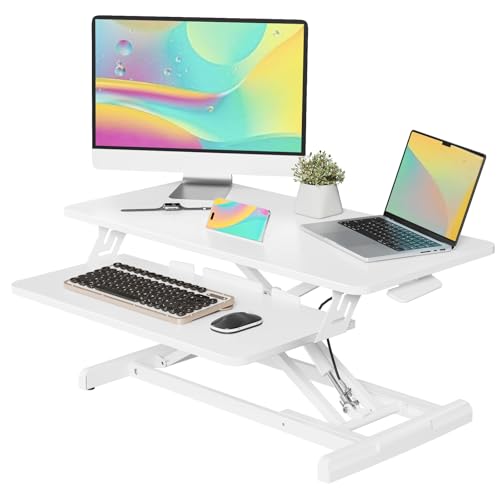 JOY worker 32" Standing Desk Converter |
8.8/10 | Buy | |
| Best Overall |
 VIVO 28-Inch Standing Desk Converter (DESK-V028S) |
9.2/10 | Buy |
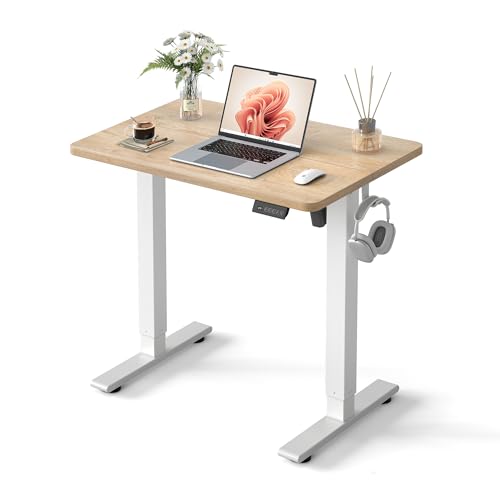 Cubiker 32-Inch Small Electric Standing Desk |
7.8/10 | Buy |
Xyulmeo 55x22 Inch Electric Standing Desk
The Xyulmeo 55 x 22-Inch Electric Standing Desk combines mid-century modern styling with a motorized lift system that spans from 28.35 to 46 inches and supports up to 300 pounds. It is a practical, attractive choice for home office professionals and apartment dwellers seeking warm wood-grain aesthetics in a space-conscious footprint.
Pros
- Substantial 300-pound listed load capacity handles computers, screens, and work peripherals.
- Smooth motorized vertical adjustment across a wide 28.35-inch to 46-inch elevation span.
- Digital control interface includes 3 convenient memory presets for one-touch height recall.
- Mid-century modern design with rounded edge profiles and an attractive oak wood-grain finish.
- Heavier 105.8-pound total build weight contributes to a grounded, sturdy frame base.
Cons
- Shallow 21.7-inch desktop depth limits focal distance if using large desktop stands or deep ultrawide displays.
- At 105.8 pounds, the packaged unit is heavy and may require two people to safely transport and assemble.
- Like many two-leg motorized desks, slight lateral sway may occur when extended near the 46-inch maximum height.
TechOrbits 32-Inch Standing Desk Converter
The TechOrbits 32-inch standing desk converter transforms standard fixed desks into versatile sit-stand workstations via a smooth pneumatic squeeze-handle lift. Supporting up to 33 pounds with simple keyboard tray assembly, it is an excellent ergonomic solution for remote workers and students looking to stand without replacing their existing furniture.
Pros
- Generous height adjustment range extending from a low 4.3-inch profile up to 19.7 inches high
- Robust aluminum frame design rated for a dependable 33-pound equipment load capacity
- Ships mostly pre-assembled, requiring only simple keyboard tray attachment with included tools
- Dual-tier layout keeps displays at eye level while preserving designated keyboard and mouse space
Cons
- Requires manual downward body pressure against pneumatic resistance when lowering the workstation
- Particle board desktop core requires careful weight distribution when attaching aftermarket monitor arms
- The 24.4-inch depth footprint claims significant real estate on shallow student desks
HUANUO 32x16 Mobile Small Standing Desk
The HUANUO Mobile Small Standing Desk features a 31.5 by 15.75-inch surface, 28 to 46-inch manual height range, and four locking casters on a reinforced Y-shaped steel frame. It is an ideal, budget-friendly mobile workstation for remote workers pairing laptops with walking pads or outfitting compact spaces.
Pros
- Generous 28-inch to 46-inch vertical range fits both standard desk chairs and under-desk treadmills
- Sturdy Y-shaped base design delivers solid weight distribution compared to standard H-frame mobile carts
- All four swivel casters feature individual step locks for dependable stationary stability
- Scratch-resistant and spill-repellent matte tabletop finish makes daily maintenance simple
- Lightweight 15.43-pound build makes moving the desk between rooms easy
Cons
- Manual height adjustment requires manual effort rather than push-button electric presets
- Shallow 15.75-inch desktop depth leaves limited room for bulky external monitors with deep stands
- Elevated heights near the 46-inch maximum may exhibit slight typing vibration on softer carpeted floors
VIVO 28-Inch Standing Desk Converter (DESK-V028S)
The VIVO DESK-V028S is a compact 28-inch pneumatic standing desk converter that provides smooth vertical lifting from 4.9 to 17.2 inches with a 28.6-pound weight capacity. It offers an efficient, minimal-assembly sit-stand upgrade for remote workers and students looking to enhance their existing workstation without replacing furniture.
Pros
- Straight-up vertical lift design saves space without swinging forward into your seating area.
- Pneumatic spring assist provides smooth height transitions between 4.9 and 17.2 inches.
- Near turnkey installation with fast keyboard tray attachment right out of the box.
- High-grade steel frame supports up to 28.6 pounds for dual screens or laptop-monitor pairings.
Cons
- Compact 27.6-inch surface depth may feel tight for users running large ultrawide displays or bulky monitor stands.
- Maximum 28.6-pound load capacity requires careful monitoring of heavy clamp mounts and peripheral accessories.
- Manual downward compression requires slight upper-body effort when resetting the pneumatic spring from standing height.
Cubiker 32-Inch Small Electric Standing Desk
The Cubiker 32-inch electric standing desk offers smooth motorized height adjustments with three programmable presets, specifically designed for small apartments and compact home offices. Its steel frame and compact spliced desktop deliver practical sit-stand flexibility for laptop and single-screen setups.
Pros
- Compact 32-inch footprint easily fits into tight spaces, dorms, and bedroom offices
- Quiet motorized adjustment under 45 dB with three convenient height memory presets
- Generous 28.3-inch to 46.5-inch vertical adjustment range accommodates seated and standing positions
- Rounded desktop corners and low-VOC construction promote a safer home environment
Cons
- Shallow 19-inch surface depth provides limited room for large monitor stands alongside keyboards
- Two-piece spliced desktop leaves a visible seam across the center of the workspace
- Lightweight 31-pound total build may experience slight lateral movement near its maximum 46.5-inch height
The Complete Guide to Styling an Ergonomic Standing Desk
Styling an adjustable workstation involves blending aesthetic intention with mechanical function. Unlike a traditional static table, an active workstation travels between seated and standing elevations throughout the day, which means every decorative item, wire, and peripheral must withstand continuous movement. Approaching your workspace design with practical spatial rules allows you to cultivate an environment that feels organized, inviting, and personalized. When done right, your desk becomes both a functional tool for posture variation and a visually grounding anchor in your room.
Establishing a Cohesive Design Theme and Color Palette
Every thoughtfully designed workstation starts with a unified color story that establishes visual harmony. Combining too many competing finishes creates sensory overload, whereas limiting your workspace to two primary tones and one accent shade produces an immediate feeling of calm. Neutral foundations like matte black, warm oak, crisp white, or brushed aluminum offer timeless appeal and match most home interior styles. Selecting hardware that shares similar finishes creates a tailored aesthetic across your monitor arms, desk legs, and desktop accessories.
Color choices also influence how light bounces across your work surface throughout the day. Dark desktops, such as deep walnut or black laminate, provide a moody, grounded aesthetic that pairs well with focused task lighting and leather accessories. Lighter finishes, such as maple, bamboo, or matte white, reflect natural window light to make small home office spaces feel open and airy. Repeating your chosen accent color in subtle elements, like a felt desk pad or a ceramic mug, ties the entire composition together naturally.
Selecting Desktop Surfaces and Materials That Enhance Workspace Mood
The material of your desktop sets the primary sensory texture of your entire workstation. Solid wood surfaces and warm oak grain finishes, such as those found on executive sit-stand desks, bring organic warmth and an upscale mid-century feel into a contemporary room. Natural bamboo tops provide a smooth, eco-friendly surface with distinctive edge banding that complements minimalist and Scandinavian interior designs. Meanwhile, durable laminate surfaces offer clean lines, high scratch resistance, and easy maintenance for high-traffic work environments.
Texture plays an equally vital role in how comfortable and stylish your desktop feels during extended typing sessions. High-pressure laminates with soft-touch matte finishes minimize harsh glare from overhead lamps and repel fingerprint smudges. Spliced wooden boards and rounded edge profiles introduce subtle architectural interest without sacrificing structural strength. Matching your desktop material to the architectural trim or flooring in your office helps your adjustable desk feel like an intentional piece of furniture rather than an industrial appliance.
Mastering Cable Concealment for Vertical Movement
Nothing ruins the clean lines of an adjustable workstation faster than a chaotic cluster of dangling power cords and peripheral cables. Because standing desks travel up to 46 inches or higher, cable routing requires extra slack to prevent cords from snagging or pulling loose during elevation. Installing an under-desk steel wire tray or raceway provides a hidden home for heavy power strips, brick adapters, and surge protectors. Fastening cables to the underside of the desk frame ensures that only a single power umbilical drops down to the wall outlet.
A flexible cable sleeve or magnetic spine is the most attractive way to guide that main power cord down to the baseboard. Choosing a sleeve color that matches your desk frame legs allows the conduit to blend seamlessly into the background. Hook-and-loop cable ties and adhesive routing clips keep display cables fastened tightly along monitor arms and crossbeams. Taking the time to conceal your wiring produces a floating, ultra-minimalist appearance that remains flawless whether you sit or stand.
Layering Functional Desktop Accessories Without Visual Clutter
Styling a desk successfully requires curating what stays on top of the surface rather than displaying every tool you own. A large desk mat serves as the visual anchor of the workstation, framing your keyboard and mouse while protecting the underlying desktop finish. Premium materials like wool felt, vegan leather, or textured linoleum add rich tactile contrast against smooth wood or metal surfaces. Choosing a mat that spans roughly two-thirds of your desk width leaves balanced margins on either side for secondary items.
Vertical organization keeps small daily tools accessible while preserving valuable surface area. Compact desktop trays, machined aluminum pen rests, and small ceramic catchalls provide designated zones for writing utensils, flash drives, and small essentials. Storing non-essential stationery inside under-desk slide-out drawers or nearby shelving eliminates visual noise from your immediate line of sight. By keeping negative space clear around your primary work zone, your desk instantly feels more spacious and calming.
Positioning Monitors and Hardware for Clean Geometric Symmetry
Computer displays represent the largest visual mass on any modern workstation, making their alignment central to the overall aesthetic. Clamping your displays to an adjustable monitor arm clears significant space beneath the screens and creates a modern, weightless look. Centering your primary display directly in front of your typing position establishes comfortable ergonomic focal alignment while maintaining balanced visual proportions. For dual-monitor setups, aligning the top bezels evenly prevents a disjointed, tilted appearance across the workstation.
Laptop placement also impacts the overall balance and symmetry of your setup. Placing a laptop on a dedicated riser alongside an external display keeps the secondary screen at eye level and matches the angle of your primary monitor. If you primarily work from a closed laptop, tucking it into a vertical aluminum stand behind the main screen hides bulky hardware and opens up working real estate. Clean geometric alignment between your screens, desk pad, and input devices gives the entire workstation a cohesive, deliberate flow.
Lighting the Workstation for Visual Warmth and Task Focus
Lighting transforms both the functionality and atmosphere of a home office workspace. An LED monitor light bar mounted directly onto the top of your display delivers even, glare-free illumination across your desk pad without consuming any surface space. Screen bars often feature adjustable color temperatures, allowing you to switch between cool white light for morning focus and warm amber light for late-afternoon reading. This targeted lighting keeps the desktop clearly visible while accentuating the rich texture of your desk mat.
Secondary ambient lighting adds depth and warmth to the surrounding room, softening the high contrast between bright screens and dark office walls. Installing a diffuse LED light strip along the rear edge of the desktop casts a gentle glow against the wall behind your workstation. Minimalist desk lamps crafted from brushed metal or ceramic materials introduce sculptural character when placed near the rear corner of the desk. Layering these light sources creates an inviting, balanced environment that looks stunning at any hour.
Styling Compact Desks, Mobile Carts, and Desktop Converters
Styling smaller work surfaces requires careful scale management so the space does not feel overcrowded. Compact desks measuring 31.5 inches wide, as well as mobile rolling workstations on wheels, benefit from ultra-minimalist accessory choices. Using a low-profile laptop stand and a compact 60 percent keyboard leaves adequate room for a mouse and a small notepad without edge crowding. Mobile carts with rolling casters look best when paired with wireless peripherals that eliminate snagging hazards when moving between rooms.
Desktop converters that sit atop an existing table present unique styling opportunities and spatial challenges. Two-tier converters provide a built-in step that naturally separates your typing zone on the lower tier from screen placement on the upper surface. Choosing a converter with warm materials, such as an eco-friendly bamboo model, softens the mechanical look of pneumatic scissor arms and steel frames. Keeping lower keyboard trays dedicated strictly to typing peripherals prevents converters from feeling heavy or visually cluttered within your office space.
Integrating Biophilic Elements and Personal Accents Safely
Introducing living plants into your workspace breathes natural vibrancy into technical setups filled with glass and metal. Small succulents, trailing pothos, or compact snake plants thrive in low-maintenance desktop planters made of terracotta, concrete, or matte ceramic. Positioning greenery near the outer corners of the desk adds organic height without obstructing your sightlines to monitors or windows. When placing potted plants on an active height-adjustable surface, choosing heavy, broad-bottomed pots prevents tipping during vertical movement.
Curated personal accents give your workstation distinctive character without tipping into visual chaos. A framed art print resting against the wall, an artisanal wooden coaster, or an architectural paperweight adds personal warmth to daily routines. Rotating personal items seasonally keeps the setup feeling fresh and inspiring throughout the year. Restricting decorative touches to two or three intentional items ensures your desk remains a serene, focused sanctuary rather than a showcase of random knickknacks.
Harmonizing the Workstation with the Surrounding Room Layout
An adjustable desk should not look like a disconnected technical island within your home. Orienting your workstation to face a window or angle toward an entryway allows natural daylight to illuminate your work surface while enhancing room flow. When placing a workstation in a shared bedroom or small living room alcove, checking your room clearance against standard furniture dimensions helps prevent the desk from crowding adjacent pieces. Maintaining open perimeter space ensures the motorized frame can elevate smoothly without brushing against drapes, floating shelves, or wall art.
Floor finishes beneath the desk frame also contribute to the overall visual presentation and stability of the station. Placing a low-pile area rug beneath the desk feet defines the workspace boundary and adds inviting color or geometric pattern to the floor. If your desk uses rolling casters, selecting a firm rug or transparent floor protector ensures smooth travel while protecting hardwood floors from friction. Coordinating the colors of your floor covering with your desktop accessories creates a cohesive aesthetic that unifies the entire room.
Daily Maintenance and Spatial Habits for a Pristine Workstation
Maintaining a beautifully styled desk depends just as much on daily habits as on initial decorating choices. Adopting an end-of-day reset routine takes only two minutes but preserves the visual clarity of your setup every morning. Returning writing tools to their catchalls, coiling charging cables, and wiping dust from your desk pad keeps surfaces looking crisp and intentional. Resetting your desk height to your preferred standing or sitting preset before stepping away sets an active tone for the following morning.
Periodic hardware checks ensure your styled setup remains safe and stable over time. Inspecting cable ties, checking monitor clamp tension, and confirming that cords have adequate vertical travel slack prevents mechanical strain on delicate electronics. Using microfiber cloths to dust natural wood grains, bamboo finishes, and metal frames preserves the premium sheen of your workstation components. With thoughtful styling and consistent care, your standing desk will continue to deliver both refined elegance and dynamic ergonomic performance for years to come.
About the author
Monique Valeris is a home editor with extensive experience covering interior design, decorating ideas, and practical household finds. Her work explores accessible furniture, storage solutions, and ways to make living spaces feel personal without overlooking budget.